For about thirty years, film was the most accessible entertainment there was for deaf audiences. Silent films told their stories in pictures and in titles, and a deaf viewer in 1920 had the same experience as everyone else in the cinema. Historians of Deaf culture call it a golden era. Then, at the end of the 1920s, the talkies arrived, and the words moved from the screen into the soundtrack.
Captions have spent most of the century since winning that access back. Today they’re everywhere: switched on by default by millions of people who hear perfectly well, burned into nearly every video in a social feed, and generated in seconds by AI. That’s a huge win. It also means more captions are being designed by people who’ve never read a subtitling guideline, in colours and styles no broadcaster would allow.
This post is about what makes captions accessible, what the standards actually say (some of it isn’t what you’ll read elsewhere), and a small piece of maths we’ve just built into our captions generator: pick any colour for your captions, and the text on it turns black or white by itself, whichever stays readable.
Who captions are for
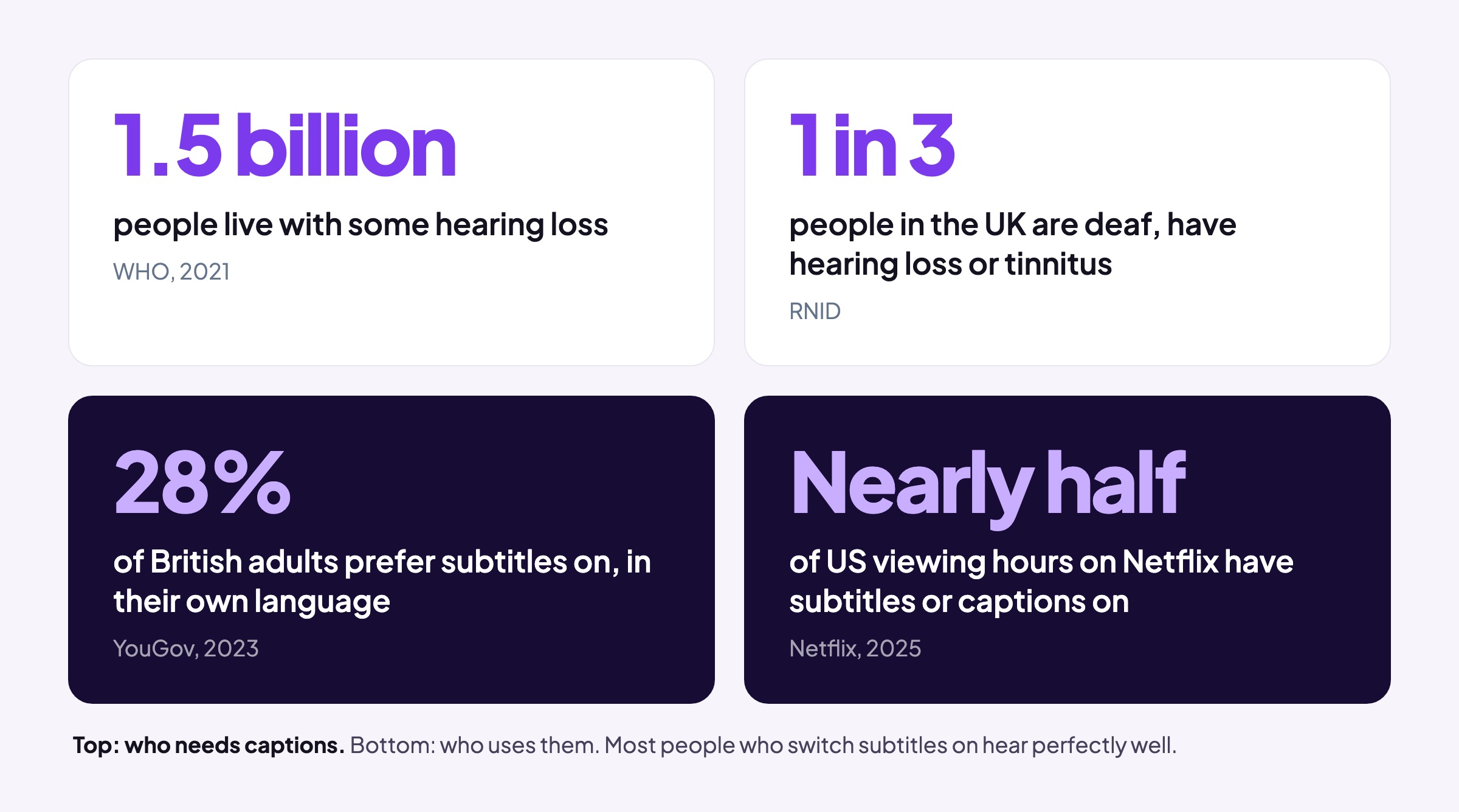
Let’s start with the people who need them. The World Health Organization’s World report on hearing (2021) estimates that more than 1.5 billion people live with some degree of hearing loss, and that 430 million of them have hearing loss moderate or worse, the level at which the WHO says people need support. (That 430 million is often misquoted as “430 million deaf people”. It isn’t: most of them aren’t deaf, they just can’t follow speech without help.) The WHO expects the total to reach about 2.5 billion by 2050.
In the UK, the charity RNID puts the figure at more than 18 million people, about one in three, who are deaf, have hearing loss or have tinnitus. You’ll still see RNID’s older figure of 12 million (one in five), quoted widely, but this has been replaced. In the US, federal survey data compiled by the NIDCD finds disabling hearing loss in 22% of adults aged 65 to 74, and 55% of those over 75.
But here’s the part that’s changed most: the people who need captions are no longer most of the people who use them.
- The BBC’s own subtitle guidelines say about 10% of broadcast viewers use subtitles regularly, rising to 35% for some online content, and that the majority of them aren’t hard of hearing.
- In a YouGov poll of 3,609 British adults in 2023, 28% said they prefer subtitles on when watching TV in their own language.
- Netflix said in April 2025 that nearly half of all US viewing hours on the service happen with subtitles or captions on, and launched a subtitle mode that leaves out sound descriptions, for viewers who can hear but want the words.
- A 2019 survey of 5,616 US adults for Verizon Media and Publicis Media found 69% watch video with the sound off in public, and that 80% of caption users aren’t hearing impaired. (It’s an advertising-industry survey, so read it as a direction rather than a measurement.)
Why? Partly the way we watch: on phones, on trains, in bed next to someone asleep. And partly the way modern film and TV sound. NPR’s 2025 report on the subject lists more sensitive microphones that allow quieter and more mumbled performances, dense sound design, streaming services compressing audio, and the “tiny, tinny” speakers built into flat TVs.
Captions also help people take things in. A 2015 review by the psychologist Morton Ann Gernsbacher gathered more than 100 studies showing that captioning a video improves comprehension of, attention to and memory for it, with the biggest benefits for people watching in a second language, children learning to read, and deaf and hard-of-hearing viewers. A 2016 survey of 2,124 US students by Oregon State University found 98.6% of students who use captions said they help, and only 19% of all the students surveyed reported any difficulty hearing.
A note on the numbers you won’t find in this post. “85% of Facebook video is watched without sound” comes from a 2016 Digiday article quoting a handful of publishers’ own analytics, on a feed that autoplayed silently and counted a view after three seconds. It was never a Facebook-wide figure. “Captions increase watch time by 40%” and “80% of Netflix members use subtitles every month” can’t be traced to any original study at all. They get repeated because they’re useful, not because they’re true.
A short history of captions
Let’s rewind almost 55 years, when captions on television began as a demonstration. In 1972 the US National Bureau of Standards showed captions hidden in a broadcast signal, and the same year PBS aired The French Chef, with Julia Child, with open captions: burned into the picture, on for everyone, impossible to turn off. In 1976 the FCC reserved line 21 of the US television signal for captions, and on 16 March 1980 the first closed-captioned programmes went out, readable with a decoder box sold by Sears. Fewer than 200,000 decoders had been sold by 1988; the Television Decoder Circuitry Act of 1990 required the decoding chip in every set with a screen of 13 inches or more, from 1993.
In the UK, subtitles arrived through Ceefax, the BBC’s teletext service. The first BBC programme broadcast with subtitles, in 1979, was a documentary about deaf children, Quietly in Switzerland. Live subtitling began in 1981, typed on a Palantype machine for Ronald Reagan’s inauguration. Decades later, subtitlers were “respeaking” live television into speech recognition software, and from April 2008 the BBC subtitled every programme on its main channels.
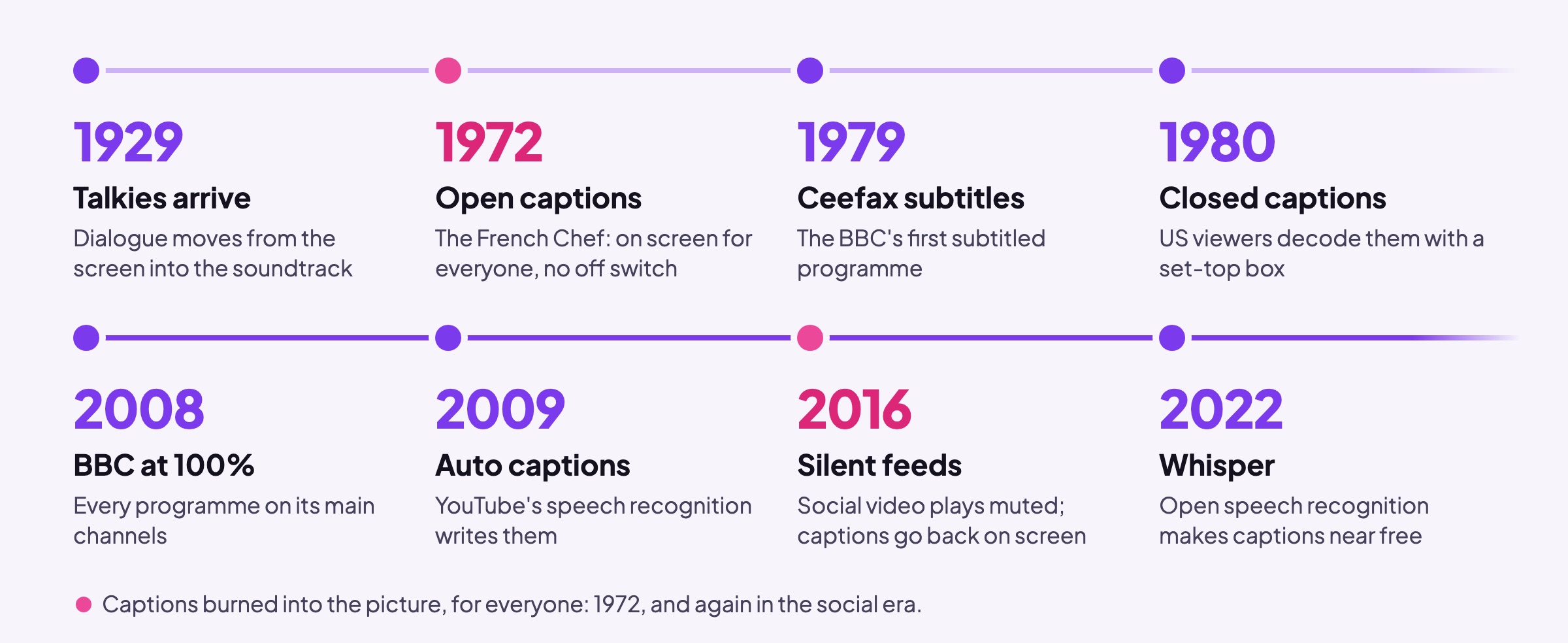
Online, YouTube launched automatic captions in November 2009. Then social feeds changed everything. Facebook started playing video silently by default and, in February 2016, added automatic captions to video ads, because an ad nobody can hear is an ad nobody watches. TikTok added auto captions in 2021. And in September 2022 OpenAI released Whisper, an open speech recognition model trained on 680,000 hours of audio, which made accurate captions close to free for anyone, including inside a web browser, which is how our captions generator works.
The big shift of the last few years is a return to 1972. Captions on social video are mostly open again: burned into the picture by the creator, styled as part of the video’s look, and impossible for the viewer to resize, reposition or switch off. That puts all the responsibility for readability on whoever makes the video.
What the standards actually say
There isn’t one rulebook for captions. There are broadcast rules, accessibility law and web standards, and they agree on more than you’d think.
UK broadcasting. Ofcom’s Code on Television Access Services sets targets (80% of programmes subtitled, over ten years, for most channels) and says subtitles only count if they’re of sufficiently high quality, judged on accuracy, synchronisation, readability, presentation and the description of sounds. Its best-practice guidelines ask for subtitles that are easy to read and clearly visible against the background, placed low on screen but moved to avoid faces and important information. For the colours, a footnote sends broadcasters to the web’s own contrast rules: WCAG, which we’ll come to.
The BBC. The BBC Subtitle Guidelines are the most detailed public rulebook there is, and worth reading in full. A few points:
- Subtitles are white on a black background, for the best legibility. Other speakers can be shown in yellow, cyan or green, always on black.
- Coloured backgrounds are no longer used.
- Lines 7 to 8% of the picture’s height for landscape video, with no more than two of them (three for vertical video).
- A reading speed of 160 to 180 words a minute, and subtitles never more than two seconds behind the words.
- Capitals only for emphasis, because text sprinkled with capitals is hard to read; and no emoji, which are hard to see.
The US. The FCC’s caption quality rules (2014) rest on four pillars: accuracy, synchronicity, completeness and placement (captions mustn’t cover faces or on-screen text). You’ll often read that US law requires 99% accuracy. It doesn’t: the FCC considered a numeric accuracy standard and chose not to set one. Separately, US rules require TVs and players to let viewers change caption colours, size (from 50% to 200%), background and edges, and online video that was shown on US television with captions must carry them online at the same quality.
Europe. The European Accessibility Act has applied since 28 June 2025. For services that give access to audiovisual media, subtitles must be synchronised, transmitted at a quality that displays accurately, and adjustable by the viewer. It doesn’t, as is sometimes claimed, require every video online to be captioned: it covers specific consumer services, exempts microenterprises, and excludes video published before it applied. The technical standard behind it, EN 301 549 (updated in 2026), asks for subtitles shown within 100 milliseconds of their timing, and for viewers to be able to change their colour, font, size and background.
Streaming. Netflix’s style guide for English subtitles asks for no more than 42 characters a line, two lines, and a reading speed of 20 characters a second for adult programmes (17 for children’s).
The web. WCAG 2.2, the W3C’s Web Content Accessibility Guidelines, requires captions for prerecorded and live video, and sets the contrast rules most of the above eventually points to:
- 4.5:1 between text and its background (Level AA), or 3:1 for large text, which WCAG defines as at least 18 point, or 14 point bold.
- 7:1 for its stricter level (AAA), or 4.5:1 for large text.
Captions are almost always large, bold text, so in WCAG’s terms the bar is 3:1 at AA and 4.5:1 at AAA. WCAG doesn’t actually say anything about captions over moving video, which has no single background colour, and that’s exactly why every broadcaster puts a solid box behind them.
The trouble with styled captions
Social captions broke most of those rules at once, and mostly for good reasons: they’re designed to be read in half a second by someone scrolling, and to look like part of the video rather than an accessibility afterthought. Word-by-word captions, in particular, have a broadcast precedent: the BBC’s live subtitles appear a word at a time to give viewers the maximum time to read.
But the styling brings real problems for some viewers:
- All capitals are harder to read, because words lose their shape.
- Fast pacing (one word at a time, at speaking speed) leaves no time to re-read.
- Animation (bouncing, popping, words flying in) pulls the eye away from the words, and some people find motion on screen uncomfortable.
- Emoji are hard to make out at caption size, which is why the BBC doesn’t allow them.
- Colour, which is the one we can fix with maths.
Coloured captions are the signature of the style: the word being spoken lit up in yellow or green, or a bright box behind it, like a highlighter. Done carelessly, it’s the least accessible part. White text on a yellow box is close to invisible. White on a bright pink or red box looks bold and fails the contrast rules. And because social captions are open, the viewer can’t fix it. That’s the problem we set out to solve in our burned-in caption styles.
How we made coloured captions readable by default
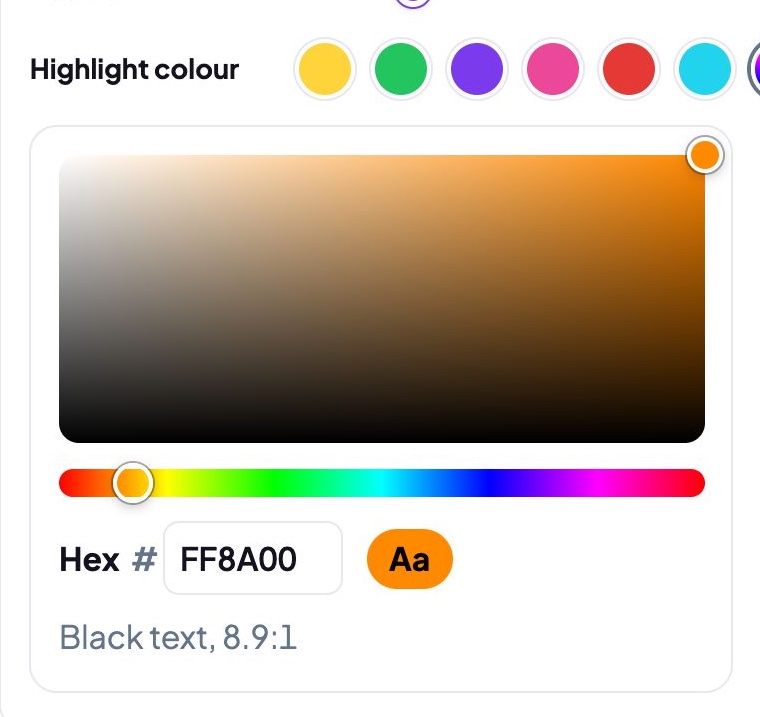
Our captions generator has five styles. One of them, Pill, puts a coloured box behind the word being said. Until now you could choose from six preset colours, each with a text colour we’d picked by eye. As of this month you can pick any colour at all from a colour picker, or type in a hex code, and you don’t choose the text colour: it’s worked out for you.
The maths
WCAG measures contrast in two steps. First, each colour’s relative luminance: how much light it gives off, from 0 for black to 1 for white. Screen colours aren’t stored as light, so each of red, green and blue is first converted back to linear light, then weighted by how sensitive our eyes are to it: green counts for 72%, red for 21% and blue for just 7%. That’s why a pure blue looks dark and a pure green looks bright, though both are “full” colours.
Second, the contrast ratio between two colours: the lighter luminance plus 0.05, divided by the darker plus 0.05. Black on white comes out at 21:1, the maximum; a colour against itself is 1:1.
For a caption box there are really only two sensible text colours, black and white, and the rule is simple: calculate the contrast of each against the box, and use whichever is higher.
Three things fall out of that, and they surprised us.
The switch from white to black happens much darker than you’d think. The point where black and white text contrast equally is a luminance of about 0.18, not 0.5. In greys, that’s #757575, a darker grey than the middle of the scale, because our eyes are far more sensitive to differences between dark shades than between light ones.
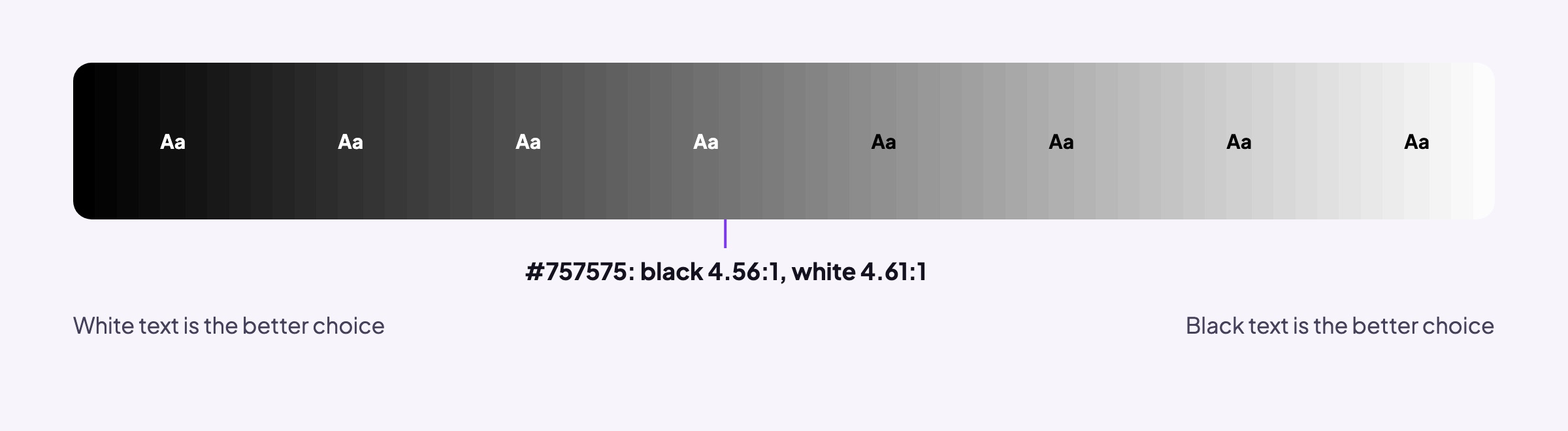
Black is the better choice far more often than white. We ran the calculation on every one of the 16.7 million colours a screen can show. Black text contrasts better on 64% of them. White text, the default most people reach for, would fail the 4.5:1 bar on 64% of all colours.
Whatever colour you pick, one of the two always passes. On the very worst colour for this (a mid grey right at the switch), the better of black and white still reaches 4.58:1. That’s above the 4.5:1 WCAG asks for normal text, and above the 3:1 and 4.5:1 it asks for large text at AA and AAA. So the picker can let you choose any colour, and the text on it will always meet WCAG at AA, without you having to know any of this.
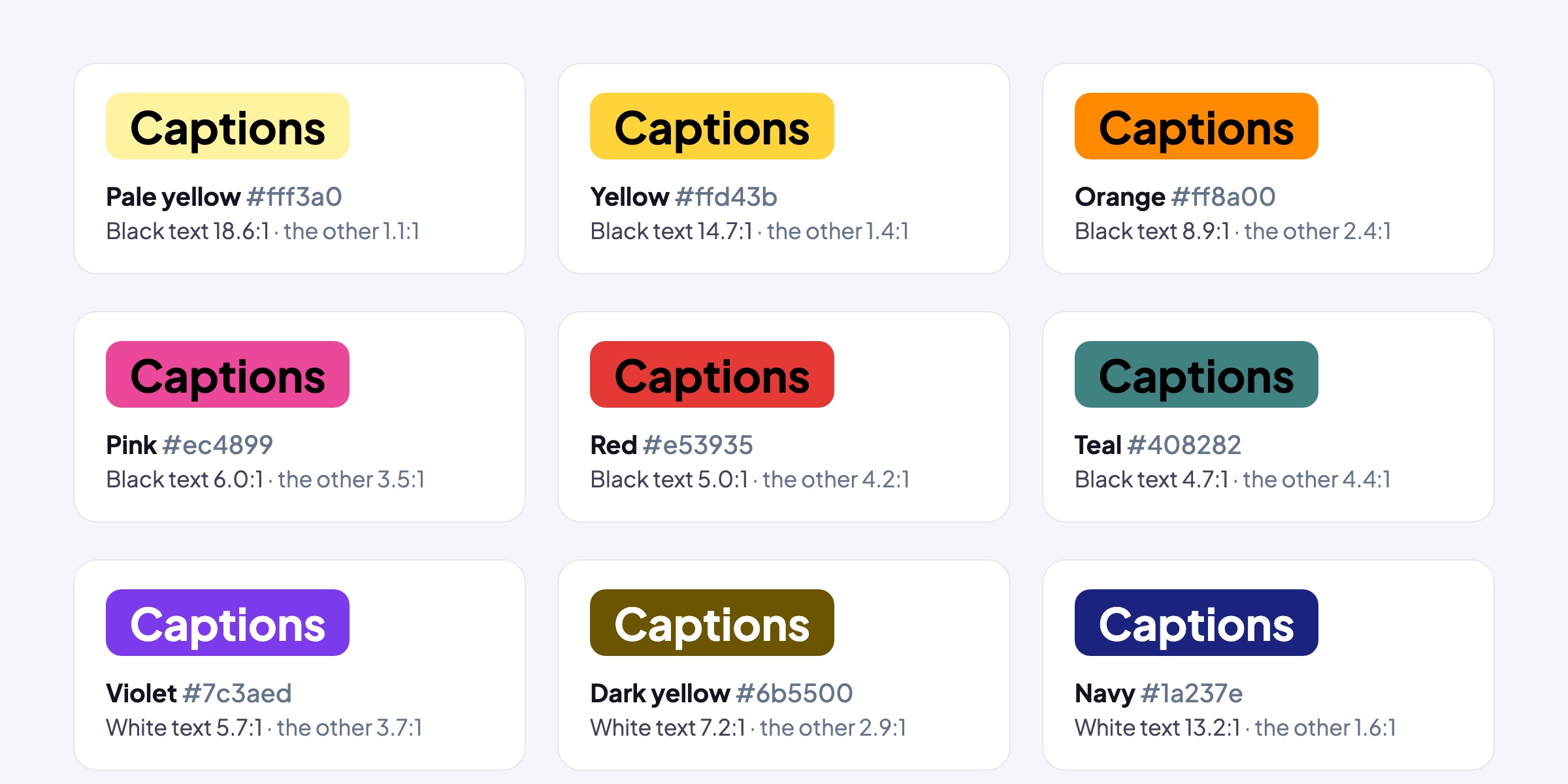
Building this changed two of our own presets. Our Pink and Red pills had white text, chosen by eye because it looked right. By WCAG’s measure, white on our pink is 3.5:1 and on our red 4.2:1, while black gets 6.0:1 and 5.0:1. So both now have black text. You’ll see the same thing in a lot of brand colours. By WCAG’s measure even pure red (#ff0000) should carry black text, at 5.3:1 against white’s 4.0:1, yet white on red is everywhere, from stop signs to subscribe buttons.
When the maths and your eyes disagree
That last example is where it gets interesting, because most designers would put white text on bright red, and many people find it easier to read. Critics of WCAG 2’s formula, including the author of the method below, point out that it’s at its weakest on saturated mid-tones like reds and oranges, where it can favour black when white reads at least as well.
The proposed fix is a newer method called APCA (the Accessible Perceptual Contrast Algorithm), which models how we perceive lightness, accounts for whether text is dark-on-light or light-on-dark, and takes the text’s size and weight into account. It’s been widely discussed as a replacement, and it would sometimes choose white where WCAG 2 chooses black.
We didn’t use it, for three reasons. WCAG 2 is the standard the law points to: the European standard EN 301 549 and the US Section 508 rules both reference it, and Ofcom points broadcasters to it. The draft of WCAG 3 that’s meant to replace it says its contrast method is yet to be determined, and doesn’t name APCA. And APCA’s reference code comes with restrictive licence terms that make it unsuitable for a product like ours. When WCAG 3 settles, we’ll look again.
In the meantime, the close calls are genuinely close. On our teal, black is 4.7:1 and white 4.4:1; either would be fine for large caption text. The rule only makes a big difference where it matters most: on the pale and bright colours where white text all but disappears.
The Highlight style
Pill was the easy case, because the text sits on a colour we know. Our Highlight style is harder: the spoken word is drawn in your colour, over the video itself, inside a black outline. We can’t know what’s behind it, so we use what we do control, the outline. If the colour you pick would contrast with its own black outline by less than 4.5:1 (a dark navy, say), we lighten it, keeping the same hue, until it stands out from the outline. The picker tells you when it’s done that.
How to make your captions accessible
Whatever tool you use, the standards above come down to a short list:
- Make them accurate. Fix names, places and anything technical. Automatic captions get most words right and the important ones wrong.
- Keep them in time. Captions should appear as the words are said, not seconds after.
- Give people time to read. The BBC works to 160 to 180 words a minute. If you use fast word-by-word captions for style, think about who that leaves behind.
- Size them generously, and keep them clear of faces and anything else on screen, including the buttons TikTok and Reels put over the bottom of the picture.
- Use contrast you can measure. White on a dark box, black on a light one, or a pill that works it out for you.
- Go easy on capitals, emoji and animation.
- Offer closed captions as well as open ones where you can. A caption file (SRT or VTT) uploaded alongside the video lets viewers resize, recolour or switch captions off, which burned-in captions never can. For a talk, a lecture or a podcast, publish a transcript of the video too: people can read it, search it and quote it.
Our captions generator does the last two for you: it exports both a video with the captions burned in and an SRT or VTT file of the same captions. It works in your browser, so your video is never uploaded, and it’s free.