When it comes to compressing video, the typical advice is to lower the quality and see what happens. But you can do better than that. There’s a point where the quality is still very good, but the file size is much smaller. And the good news is that you can measure this point. Most videos are recorded at a high quality, so they can be compressed a lot without noticing a difference. A video shot on a phone can usually be compressed to half its original size, or even less, and it will still look the same to the naked eye.
In this guide we explain what “without losing quality” really means, what settings you need to get right to compress video without losing quality, and then review the free video compressors available, including our own Oh So Video compressor.
Key takeaways
- “No visible loss” can actually be measured. For camera footage, no visible loss corresponds to a score of about 95 on the VMAF picture-quality scale, which in our tests took about 0.1 bits per pixel.
- Preserve the original resolution as much as possible. If you must downscale, keep the frame rate and encode at an appropriate bitrate for the resulting resolution.
- The frame rate matters less than people expect.
- Use a video compressor that checks the size of the resulting video, because some video compressors exceed the given limits at very small sizes. That’s a problem if you need to be under a certain size.
- Free upload sites often add a watermark or require an account, and stop at around 500 MB to 1 GB. Most in-browser tools, as well as the desktop app HandBrake, don’t have these restrictions.
What does “without losing quality” actually mean?
Compressing re-encodes the picture with fewer bits. A good encoder spends its bits where detail is easy to see and saves them where a loss won’t be noticed. Some information is always lost, so really what we mean when we say “without losing quality” is without a loss you can see.
To measure this we used VMAF (Video Multi-Method Assessment Fusion), a tool developed by Netflix that compares the originally recorded video with the compressed video, frame by frame. Its score runs from 0 to 100, and as a rough guide:
- 93 to 100: visually indistinguishable from the original for most viewers.
- 80 to 92: excellent to very good; minor compression artefacts may show in difficult scenes.
- 70 to 79: fair; artefacts are visible when you look for them.
- Below 70: noticeable quality loss.
We used it to set our own presets: on typical camera footage, 0.1 bits per pixel scored 95 to 96.5, and going to 0.15 bought only about another point and a half for half as many bits again. On 720p phone footage, 0.036 bits per pixel scored 80 (visibly softer), 0.072 scored 92 and 0.145 scored 97.9.
Bits per pixel is simply the bitrate divided by the picture’s size and frame rate. A 1080p video at 30 frames a second needs about 6 Mbps to reach 0.1. Many phones record at 15 to 20 Mbps or more, which is why there’s so much room to shrink.
Which settings decide the quality?
There are three key attributes:
- The bitrate (or the size you set, which decides it). This is the main one.
- The picture size. Fewer pixels need fewer bits, but each one then has to be enlarged when it’s played on a big screen.
- The codec. H.264 plays everywhere. H.265 (HEVC) needs fewer bits for the same picture but doesn’t play everywhere, which is why iPhone videos sometimes need converting from MOV to MP4 before they’ll play on a Windows PC or a website.
Frame rate matters less than people expect. Halving it rarely halves the size, because consecutive frames already share most of their data.
Should you keep 1080p or drop to 720p?
Well, it really depends on the footage, and it’s worth testing this rather than guessing. We compared the two at the same file size, measuring VMAF at the size the viewer would watch it:
- Phone video and clean stock footage looked better at 1080p at every size the encoder could make, by up to 8 points.
- Busy handheld footage (grass and leaves moving) looked better at 720p until it had about 0.042 bits per pixel, and was 11 points behind at 1080p when squeezed hard.
So the simple rule “drop to 720p below this bitrate” does not always produce a good outcome. When size is constrained, our compressor makes short samples at both sizes and keeps whichever is closer to the original.
How we judged the free compressors
For all the tools we tested (including our own) we applied the following methodology:
- Usage limits: is it really free? No watermark, no account, no daily cap.
- Does it hit the size you ask for? Under, not “about”.
- How does the result look at that size? Measured with VMAF.
- Where does your video go? Uploaded to a server, or kept on your device?
Without further ado, let’s dive in.
What kinds of compressors are there?
- Server-side processing sites such as Clideo, VEED and FreeConvert: the video is uploaded to their server and is delivered back to you compressed. Easy to use, but big files are slow to upload, and you’re also at the mercy of a queuing system if many people are using the service.
- In-browser tools (Oh So Video, VideoCompress.dev, VidShift, compress.lol): the compressing happens on your own computer or phone, inside the browser, and nothing is uploaded. Great for privacy.
- Desktop apps such as HandBrake: installed software, with the most settings, and tend to be more technical and suited to professional use.
How do the free compressors compare?
From each tool’s own website, checked 2 October 2026.
| Tool | Type | Uploaded? | Free limits | Target a size in MB? |
|---|---|---|---|---|
| Oh So Video | In-browser | No | No size limit, no watermark, no account | Yes, and re-encodes if it’s ever over |
| VideoCompress.dev | In-browser | No | No size limit, no watermark, no account | Yes, but approximate, not a guaranteed size |
| VidShift | In-browser | No | No size limit, no watermark, no account | Yes |
| compress.lol | In-browser, open source | No | Up to 2 GB a file, no account | Yes, re-compresses if it goes over |
| HandBrake | Desktop app | No | Free and open source | No: target size was removed in 2012 (version 0.9.6) |
| Clideo | Upload site | Yes | 500 MB; watermark unless you pay for Premium | Only through its compression presets |
| VEED | Upload site | Yes | 1 GB; account required; watermark on free exports | A quality slider rather than a size |
| FreeConvert | Upload site | Yes | 1 GB | A percentage of the original file’s size |
What happened when we set a tight size limit?
We ran one 15-second 1080p clip (9.7 MB) on 15 September 2026 through three in-browser tools, all in Chrome on a Mac.
- 4 MiB (4.19 MB): all three tools produced compressed videos of nearly identical quality within the given size.
- 2 MiB (2.10 MB): the other two encoders went over this size limit (2.38 MB and 2.23 MB). Our own tool, however, stayed under at 2.04 MB.
However, there is a floor: Chrome’s H.264 encoder (the hardware encoder on this Mac) wouldn’t encode 1080p at less than about 1.08 Mbps, even when told to use 0.82 Mbps, so there just isn’t going to be a 1080p version of this clip smaller than about 2.27 MB. Both of the “over” files were 1080p. Checking the result, and re-encoding the whole video at a smaller picture size when it’s over (as Oh So Video does), is the way round it.
The verdict: which free compressor should you use, and when?
Oh So Video
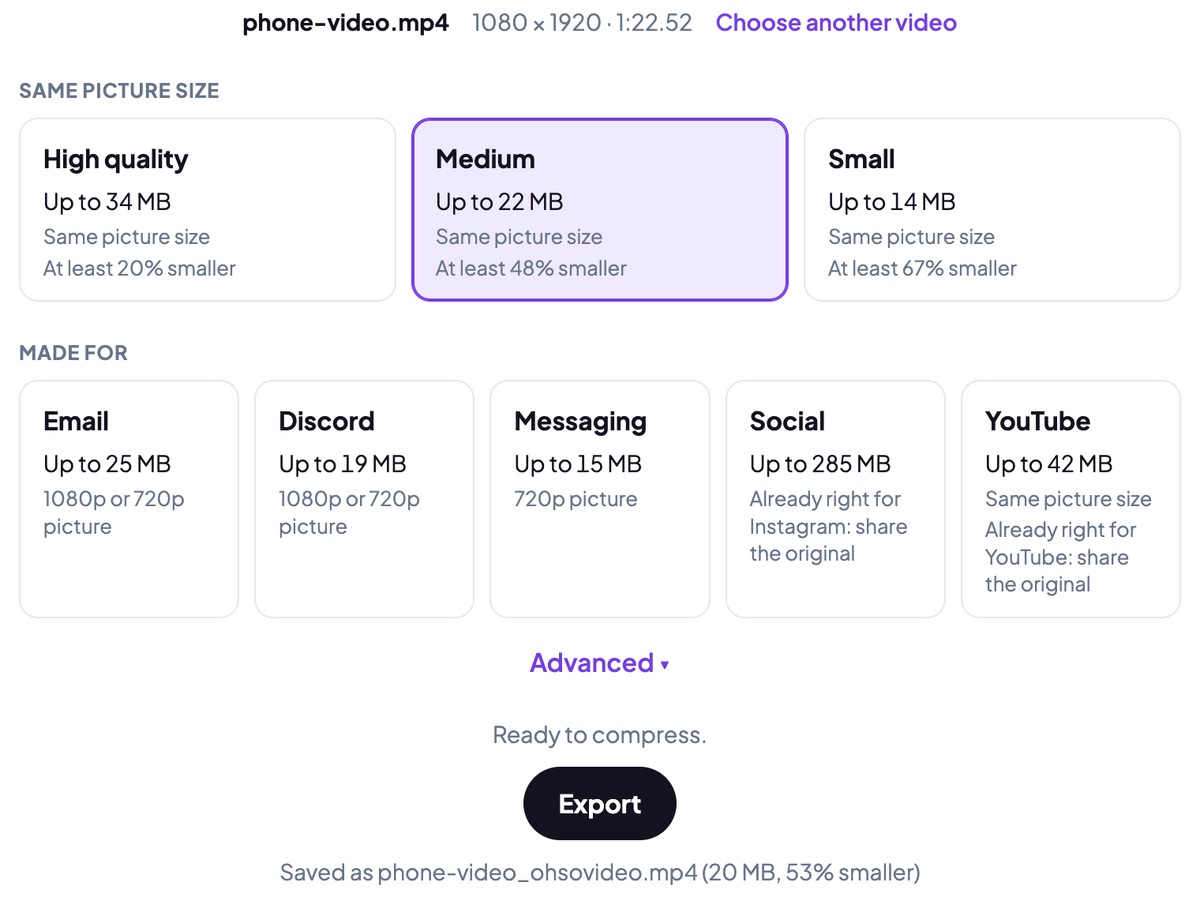
Useful for when a video has to fit under a hard limit (compressing for email, say), or can’t leave your device for privacy reasons. It takes into account the destination (Gmail, Outlook, Discord, WhatsApp, Instagram, YouTube) and automatically adjusts the picture size and frame rate for the best result. It has no file size limit and can read ProRes files. It can also compress several videos at once.
Trade-off: it works on your device, so large 4K videos export much faster on a computer than on a phone. Also, Firefox can’t export iPhone HEVC video, but Chrome and Safari can.
VideoCompress.dev
Useful for quick compression with lots of platform presets: about 40 destination pages, including WhatsApp, email and GitHub. Note that its size is approximate, so check the result against a hard limit.
VidShift
Another site with many browser video tools in one place. However, VidShift went over the limit at a tight size in our test.
compress.lol
Open source, so you can read the code or run it yourself. It has presets for Discord, Discord Nitro, WhatsApp and Gmail/Outlook, and re-makes a video that comes out too big. Its limits: files of up to 2 GB, and a slower software encoder on browsers without a suitable hardware one.
HandBrake
It’s free, it’s open source, and it’s excellent for people who really want to get into and understand what’s going on with video. Download required, a steep learning curve, and no “make it X MB”: you set the bitrate and work out the size from that.
Clideo and VEED
The compressor is built into Clideo’s and VEED’s editors, which makes it easy to compress a video you’ve already edited there. Trade-offs: your video is uploaded; Clideo’s free tier stops at 500 MB and adds a watermark unless you pay for Premium; VEED needs an account and puts a watermark on free exports.
FreeConvert
An upload site with the most settings: you can change the quality, choose H.264 or H.265, and set the bitrate and resolution. It has a 1 GB free limit. Note the size is set as a percentage of the original file’s size, not in MB.
What’s the best free compressor for email?
The best free video compressor for email is one that lets you choose the email provider’s limit and guarantees that the resulting video will be under that size. Email sends attachments encoded as text, which makes them about 37% bigger than the video itself, and some providers count the attachment at that encoded size.
- Gmail: 25 MB of attachments, counted as the files are. Aim for 25 MB.
- Outlook.com and Yahoo: 20–25 MB a message. Aim for 18 MB.
- The Outlook app: 20 MB a message. Aim for 14 MB.
- Work email: often 10 MB a message. Aim for 7 MB.
Several videos in one email share the same total limit. Our tool to compress video for email shares the limit out between them, so the whole message fits. If your video is still too large to send, have a look at video file too large to send?
What’s the best free compressor for Discord?
Discord’s free limit has been 20 MB since August 2026 (it was 10 MB before, and some people still see 10). Aim for 19 MB. Discord sends the file as it is, so what you make is what people see: keep 1080p where the length allows, and use a compressor that won’t go over, or the upload simply fails. Every platform’s limit is on our video size limits page.
How do you choose the right compression tool for your needs?
Ask three questions, in this order:
- Does it have to fit a hard limit? Then use a tool that checks the size.
- Can the video leave your device? If not (client footage, anything personal), use an in-browser tool or a desktop app.
- One video or a hundred? For a few, a browser tool. For regular big batches, a desktop app.
Frequently asked questions
Can you compress a video without losing any quality?
Not in the strict sense: re-encoding always discards something. But at about 0.1 bits per pixel the difference is invisible, and most phone videos are recorded with several times that, which is why they shrink so much without looking any different.
What is the best free video compressor?
It depends on the job. For a video that has to fit a limit, use a tool that checks the result and re-encodes if it’s over. For privacy, use one that works in your browser or on your computer. For full manual control, HandBrake.
Should I lower the resolution to make a video smaller?
Only when there aren’t enough bits for the full size. On phone video, keeping 1080p looked better than dropping to 720p at every size we could make, but some busy footage looks better at 720p when the size is very tight.
Is H.265 (HEVC) better than H.264 for compressing?
It needs fewer bits for the same picture, but not every phone, computer or website plays it. H.264 plays everywhere, which is why most compressors, ours included, produce it.
Is it safe to compress a video online?
An upload site keeps a copy of your video on its server, at least for a while. A compressor that works in your browser never receives the video at all, so there’s nothing to keep.
Sources
- Toward a practical perceptual video quality metric (VMAF), Netflix Technology Blog
- Gmail attachment size limits, Google Support
- Discord raises its free upload limit, Yahoo Tech
- HandBrake: target size removed, HandBrake on GitHub
- Each tool’s own site, 2 October 2026: VideoCompress.dev, VidShift, compress.lol, Clideo, VEED, FreeConvert
Updated 3 October 2026.